The standing file · minutes, not notes
AI meeting minutes: how to turn a note-taker's draft into minutes that count
AI can draft meeting minutes, but it cannot sign them. Every note-taker on our board produces a summary, decisions in plain words and action items, which is most of the typing. Formal minutes also need things a microphone does not reliably capture: whether there was a quorum, the exact wording of each motion, who moved and seconded it, and how the vote went. Treat the AI output as the secretary's first draft, and the record stays sound.
Full guide: The shortlist of AI meeting note-takers
It is not legal advice. Rules on minutes, records and recording differ by organisation, country and state, so check your bylaws and ask counsel before you set a policy.
Notes and minutes are different documents
Meeting notes are for the people who were there: what was said, what to do next. Minutes are for the people who were not, including auditors, regulators and next year's committee. They record what the meeting decided and the facts that prove the decision was properly made. That is why minutes are usually shorter than notes, and why a 40-minute AI summary pasted into a minute book is the wrong document, however accurate it is.
The useful question is therefore not "can AI take minutes?" but "which parts of the minutes can it draft?" The grid below is our answer, part by part.
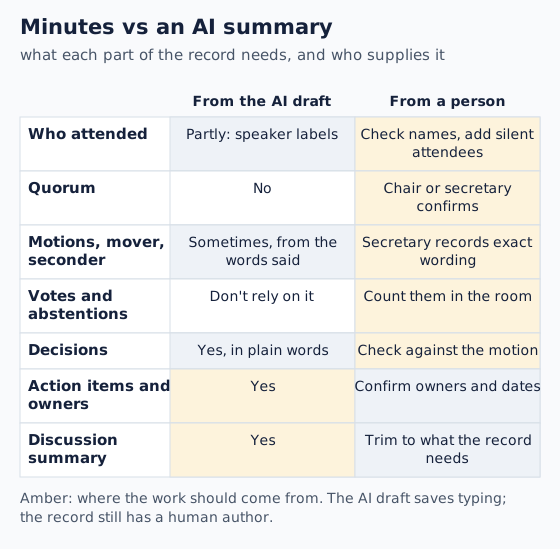
Two rows deserve a word. Attendance looks easy for software, but speaker labels only know people who spoke, and only as well as the audio allows; a director who dialled in from a car and said nothing is invisible. Votes are worse. "Those in favour?" followed by a murmur and three raised hands produces nothing a transcriber can count. Whoever chairs should say the result aloud, so that it reaches both the room and the recording.
From AI draft to approved minutes in five steps
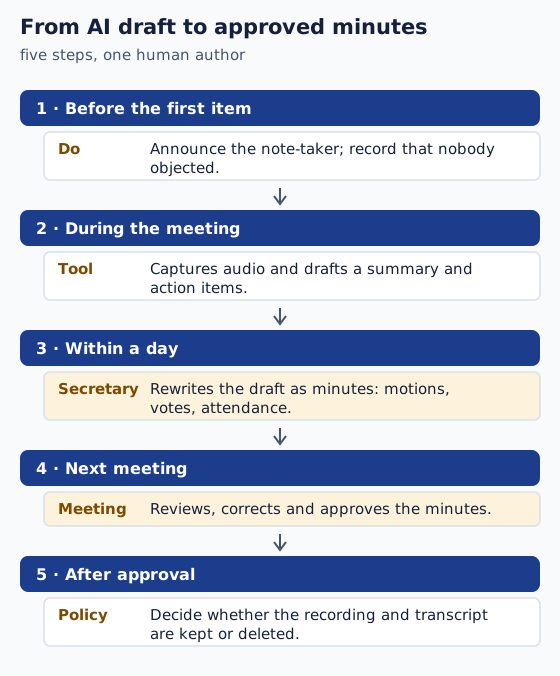
The middle step is where the time goes, and it is less than it sounds. Open the agenda beside the AI summary and work item by item. Copy across the decision, then replace the summary's paraphrase of each motion with the words that were actually put to the meeting. Add mover, seconder and result from the chair's notes. Delete the discussion that the record does not need. What remains is usually a page, and the AI has saved you the hour of reconstructing who said what.
Keep the AI summary to yourself until the minutes are approved. Two documents describing the same meeting in different words invite the question of which one is right, and the honest answer is "the approved one".
Consent comes before the first agenda item
Readers reach this desk with a version of the same question: a board where every recording bot makes somebody uncomfortable. Two fixes exist. One is bot-free capture, which our bot-free guide covers; the other is a human minute-taker with a pen, which costs nothing and is still the best tool for a sensitive board. Neither removes the duty to tell people.
The vendors say the same. Granola's consent page, read on 18 Oct 2026, tells teams to "check with your team admin or legal team on what types of meetings you can transcribe". Zoom, on its My Notes page, points to the on-screen marker its meetings show during transcription. Where you are decides how much agreement the law asks for, and in some places it is everyone's; our consent guide has the words to use. A line in the minutes saying the meeting was told about the note-taker and nobody objected is cheap insurance.
Edge cases
Closed or executive sessions. Switch capture off and say so; the minutes record that the session happened, not what was said. The transcript outlives the minutes. Once minutes are approved, an AI transcript is a second, unedited account of the same meeting sitting on a vendor's servers. Decide in advance whether it is kept or deleted, and check what your tool's retention settings allow; our privacy rundown lists the questions to ask. Public bodies. Open-meeting and public-records rules can reach recordings as well as minutes; that is a question for your clerk or counsel. Noisy rooms. A summary built from a bad recording mislabels speakers first, and speakers are what attendance and motions depend on; our accuracy guide explains the chain.
Fair questions
Can AI write meeting minutes?
It can write a good first draft: summary, decisions and action items. Quorum, exact motion wording, movers, seconders and vote counts still need the secretary, and the minutes only become the record when the meeting approves them.
Are AI-generated minutes legally valid?
Validity usually comes from approval by the body that met, not from who typed the draft. Your bylaws and local law decide the details, so treat this as orientation, not legal advice.
Is there a free way to get AI meeting minutes?
Several note-takers have $0 plans that produce summaries you can turn into minutes; our shortlist compares what each plan includes. The rewriting step is the same whatever you pay.
Should the recording be kept after the minutes are approved?
That is a policy decision for your organisation. Many keep only the approved minutes so that one account of the meeting exists; whatever you choose, decide before the meeting and set the tool's retention to match.
Do I need to tell people an AI is taking the minutes?
Yes, as a matter of good practice everywhere, and in some places as a matter of law. What the law requires depends on where the participants are. Announce it before the first item and note it in the minutes.