The explainer
How AI note-takers work, from audio to action items
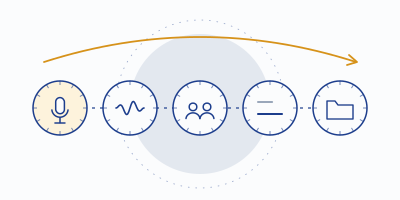
Vendor pages describe these tools in incantations — "AI-powered conversation intelligence" — that explain nothing and compare worse. Here's the actual machine, step by step, with the failure modes at each stage. Once you see the pipeline, every review on our shortlist reads clearer.
- 0Capturebot, device, or upload
- 1Speech recognitionsound becomes words
- 2Diarizationwords get owners
- 3Summarizationtranscript becomes minutes
- 4Extraction and filingaction items, owners, CRM fields
Step 0 — Capture: getting the audio at all
Before anything intelligent happens, the tool needs the sound of your meeting, and there are only three honest ways to get it:
- The bot. A headless participant joins your Zoom/Teams/Meet call and records what it hears. This is how Otter's OtterPilot and Fireflies' Fred work. Upside: platform-blessed, gets clean per-meeting audio. Downside: it occupies a seat, everyone sees it, and it only works on platforms the vendor integrated. (The social dynamics deserve their own essay — they got one.)
- Device-level audio. The tool sits on your computer as a virtual audio device and captures the conversation as it passes through — no bot, any app. This is Krisp's architecture, born from its noise-cancellation plumbing; Fathom now offers a bot-free mode in beta. Upside: invisible in the participant list, app-agnostic. Downside: it's a desktop install, and disclosure is entirely on you — announce it.
- The upload. You hand the tool a finished recording. Slowest loop, but it works for anything ever recorded — subject to import meters like Otter's three-lifetime-files free cap.
Step 1 — Speech recognition: sound becomes words
Automatic speech recognition (ASR) converts the waveform into text. Modern engines are neural models trained on enormous piles of speech, and in clean audio they're startlingly good — which is exactly why their failures surprise people. The model predicts the most probable word sequence given the audio; when noise or distance blurs the evidence, it doesn't output static, it outputs a confident guess. That's how "we can't commit to Q2" becomes "we can commit to Q2." The engine did its job; the microphone lied to it. This is the whole thesis of our accuracy file: the recognizer amplifies input quality in both directions.
Where the ASR runs matters too. Most tools transcribe in the cloud; Krisp documents on-device English transcription, which keeps raw audio on your machine — a privacy distinction covered in the privacy rundown.
Step 2 — Diarization: words get owners
Diarization answers "who said that?" by clustering voice characteristics into speaker tracks. Platform bots get help — meeting software often knows which participant's stream is active — while device-level and uploaded audio lean on acoustics alone. It fails predictably: two similar voices merge into one speaker; one person with a headset change splits into two; crosstalk gets attributed to whoever spoke last. When you see minutes that quote the wrong person, diarization is usually the culprit, and one-voice-at-a-time facilitation is the free fix.
Step 3 — Summarization: transcript becomes minutes
A large language model reads the (possibly flawed) transcript and writes summaries, decisions, and action items. Two properties matter:
- It smooths. LLMs write fluent prose over rough input. A transcription error doesn't survive as visible garbage — it survives as a plausible sentence nobody said. Fluency is not fidelity.
- It compresses by judgment. What counts as "the decision" is a model's editorial call. Vendors tune this differently — hence Fathom's stock summaries versus its paid custom templates, or Fireflies' per-meeting-type formats. This is the layer where tools genuinely differ most, and it's also the layer most rescueable by re-running with a better prompt or template.
Step 4 — Extraction and filing
Action items, owners, dates, CRM fields. This is pattern extraction over the summary layer, and it inherits everything below it — a mis-heard name in step 1 becomes a task assigned to the wrong human in step 4, at scale, automatically. It's also where Fireflies earns its keep for teams: the filing into CRMs and task tools is the product. Our advice is unglamorous: for your first weeks with any tool, treat auto-extracted action items as drafts and confirm owners aloud before the meeting ends.
Reading vendor pages with pipeline eyes
- "99% accuracy" → ask: measured on what audio? (See why we never print such numbers in our method.)
- "Works with 100+ apps" → usually means device-level capture (good, and bot-free) or calendar integration (weaker claim). Which step is being described?
- "AI assistant across all your meetings" → step 3-4 features, metered by credits at some vendors — check the meter, not the demo.
- "Unlimited transcription" → step 1 is unmetered; ask what happens at step 0 (capture caps) and after (storage caps — Fireflies' free tier is the case study).
- "Noise-robust" → nothing in steps 1–4 can restore what step 0 lost. The only architectural fix is cleaning audio before recognition — which is Krisp's whole design.
The one tool that cleans step 0 first
Krisp cancels noise at the capture layer, then transcribes the cleaned signal on the same machine — the pipeline in the right order, no bot seat, free tier included.
Noted for the record: this is an affiliate link. A subscription started from it pays MinuteHand a referral fee; your price stays the list price.Small glossary, minute-taker approved
| Term | Plain meaning | Watch for |
|---|---|---|
| ASR | Speech-to-text engine | Quality tracks your audio, not the brochure |
| Diarization | Who-said-what labeling | Fails on crosstalk and similar voices |
| Speaker ID | Naming diarized voices | Often needs a one-time voice tag per person |
| Conversation intelligence | Analytics over many calls | Team-tier pricing usually applies |
| AI credits | Metered assistant usage | The demo assistant is rationed in production |
| On-device | Processing on your machine | Rare; check which languages qualify |
| Bot-free capture | Recording without a bot participant | Your announcement is the only disclosure |