The brief · our board leader for meeting notes
Krisp AI Meeting Assistant for meeting notes: the brief
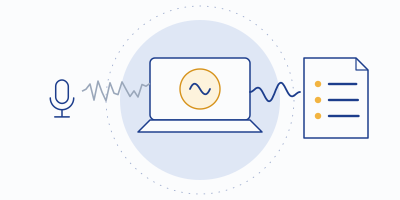
Krisp built its name cancelling background noise. The AI Meeting Assistant is what happened when the same pipeline learned to write things down — and because it listens at your device instead of joining your call, it's the note-taker your guests never have to meet. It tops our shortlist at 8.3; this page is the working behind that.
Disclosure: Krisp buttons on this page are affiliate links — subscribe through one and Krisp pays MinuteHand a referral fee, while you pay the ordinary price. Every claim below comes from Krisp's site and documentation, checked 2026-09-20.
What it is, in one paragraph
The AI Meeting Assistant records, transcribes, and summarizes meetings from inside Krisp's desktop app. Krisp already sits between your microphone and your meeting software as a virtual audio device — that's how the noise cancellation works — so the assistant captures conversation at the audio level, on your machine. No bot appears in the participant list (Krisp offers an optional bot for platforms like Zoom if you prefer one), and because the capture point is your device, it works with effectively any conferencing app: Zoom, Teams, Meet, Slack huddles, softphones, the lot. Out the other end come transcripts with speaker labels, AI summaries, and action items.
Why the capture design matters twice
Once for etiquette: nobody's meeting gets an uninvited "Notetaker" participant. If you've watched a candidate or a client eye the bot in the corner, you know what that's worth — we wrote up the whole social problem in notes without a bot. (Capture without a bot is still recording: announce it anyway.)
Once for quality: the assistant transcribes the same signal Krisp just cleaned. Every other tool on our board transcribes whatever audio the meeting delivers — espresso machine, roommate, boomy kitchen included — and noise is precisely what makes transcripts fall apart. Krisp is the only product we cover where the noise layer and the note-taker are the same install, in the right order.
- Your microphoneyour voice, plus the room
- Krisp, on your devicecleans the signal first
- Any meeting apphears the cleaned audio
- Transcript and noteswritten from the same clean signal — no bot seat
What the free plan actually includes
| Free | Core — $8/mo annual · $16 monthly | |
|---|---|---|
| Transcription | Unlimited transcripts | Unlimited |
| AI meeting notes | 2 per day | Unlimited notes & action items |
| Noise cancellation | 60 min/day, renews daily | Unlimited |
| Recording | Included | Included, unlimited |
| Extras | — | Multilingual transcripts, AI chat, 1 hr/day accent conversion |
The free arithmetic is friendlier than it first reads. Sixty noise-cancelled minutes renew every day — a fresh hour daily, roughly 30 free hours a month, and Krisp's changelog notes you get 1.5× the daily minutes if you sign up with a work email. Transcription itself is unmetered on free: when the noise-cancellation hour runs out, transcripts keep flowing; only the polished AI notes are rationed at two a day. For one or two important meetings daily, the $0 tier is a complete workflow.
Above Core sits Advanced ($15/mo annual, $30 monthly) with unlimited accent conversion, deeper integrations like Salesforce, and 60 GB of storage; Enterprise adds SSO/SCIM, HIPAA compliance options and on-device transcription controls. Most readers of this site need exactly one decision: free until the 2-notes-a-day ceiling annoys you, then Core.
Languages and where processing happens
English transcription runs on-device — your audio doesn't need to leave your machine to become text, which is both a speed and a privacy statement, and rare in this category (see our privacy rundown for how rivals route audio). Beyond English, Krisp documents server-based transcription in 15 additional languages, with broader multi-language support arriving through its AI features. If your meetings switch languages mid-call, read Krisp's current docs before assuming — that corner moves fast.
The honest limits
- It's a desktop-app workflow. The assistant lives in Krisp's Windows and macOS apps. If you want a purely browser-based tool with nothing installed, this isn't that.
- Two free AI notes a day is a real ceiling for back-to-back schedules — that's the tier line working as intended.
- Note formats are leaner than the template catalogs at Fireflies or Fathom Premium. You get clean summaries and action items, not a template gallery.
- The noise meter is real on free. An hour a day covers most days and not marathon days; the meter is the upsell, plainly labeled.
Verdict
8.3 / 10 on our rubric — the right architecture for honest minutes
Top marks for capture design (9) and transcription (9), strong free tier (8), $8 Core pricing (8), and the category's best privacy story for English (8). Computed by tools/score.py with published weights — working on the shortlist. If your requirement is purely "maximum free notes tooling, never mind audio," Fathom runs it close at $0.
Clean audio in, honest minutes out
Unlimited free transcripts, two AI notes a day, a fresh hour of noise cancellation daily, no bot at the table. Install it before your next call and see what your transcripts were missing.
Affiliate link — disclosure above. Prices checked 2026-09-20; trust Krisp's checkout over our table.Fair questions
Does bot-free mean the recording is secret?
No, and don't treat it that way. Bot-free removes the awkward participant, not your obligation to tell people they're being recorded. Consent rules vary by state and country — the practical guide is here, and it's not legal advice.
Do the free noise-cancellation minutes limit my transcripts?
No — per Krisp's help docs, transcripts stay unlimited and you still get your daily AI notes even after the day's noise-cancellation minutes run out. The two meters are separate.
Will it work with our obscure conferencing tool?
Almost certainly — Krisp presents itself to the OS as a microphone and speaker, so anything that accepts an audio device works. That's the architectural difference from bot-based tools, which must support each platform explicitly.